
Chatboti do výuky bezpečně a didakticky správně

V Tiny si každý žák povídá s vlastním chatbotem k tématu, které zadáte. Chatboty připravili didaktici ve spolupráci s pedagogy — neposkytují odpovědi, ale vedou žáky otázkami. A vy máte přehled o všech rozhovorech a po hodině dostanete shrnutí.
Zdarma pro učitele i žáky. Registrace přes Google, Microsoft nebo e-mail.

Pro koho je Tiny
Pro pedagogy, kteří chtějí AI v hodině využít, ale nechtějí ztratit kontrolu

Učitelé napříč předměty
Jazyky, přírodověda, dějepis, ZSV, matematika i odborné předměty. Tiny funguje na ZŠ i SŠ.

Učitelé, kteří AI už zkoušeli
U jiných nástrojů narážejí na to, že nevidí, jak s AI žáci pracují, a nemají kontrolu nad obsahem.

Žáci od 13 let
Vhodné pro všechny žáky od 13 let na základních a středních školách

Chatboti, kteří učí žáky přemýšlet
Tiny je vzdělávací aplikace s jedenácti chatboty do hodiny. Připravili je naši didktici. Vy zadáte jen téma (např. „opakování přítomného času“) a Tiny se postará o zbytek. Každý žák poté vede vlastní rozhovor k tématu. Místo odpovědí mu chatbot klade otázky, které ho posouvají v přemýšlení dál.
Vy do všech rozhovorů průběžně vidíte a kdykoli si je můžete projít. Po skončení hodiny dostanete od Tiny shrnutí — co se probíralo, kde se žáci nejčastěji zasekli a co příště zkusit jinak.
Vyberete z 11 připravených chatbotů
Příprava hodiny zabere pár minut
Čtyři kroky od registrace ke spuštěné hodině s chatbotem
Vyberete chatbota
Z jedenácti typů chatbotů vyberete toho, který odpovídá cíli hodiny — opakování, diskuse nebo třeba historickou postavu.
Zadáte téma
Jednou větou — třeba „Procvičování přítomného času.“ O didaktickou stránku rozhovoru se postará Tiny.
Žáci se připojí
Žáci se zaregistrují, zadají čtyřmístný kód a jsou v hodině. Žádná instalace, vše běží v prohlížeči.
Vše pod kontrolou
Během hodiny máte možnost prohlédnout si veškeré konverzace. Po skončení lekce vám Tiny pošle shrnutí.


Máte vždy přehled
Kdykoliv si můžete zobrazit náhled konverzace každého žáka, sledovat průběžné dění v hodině a na konci si nechat vytvořit shrnutí konverzací.
Přehled konverzací v reálném čase
Otevřete chat libovolného žáka a vidíte celý jeho rozhovor — na co se ptal, jak chatbot odpovídal a kde se případně zasekl.
Shrnutí hodiny od Tiny
Po skončení hodiny vám Tiny dá celkové shrnutí — jaká témata se v hodině probírala, kde se žáci nejčastěji zasekli a co příště zkusit jinak.
Chatboti, kteří se drží tématu
Tiny chatboti zůstávají u tématu, které pro hodinu zadáte. Pokud se konverzace začne stáčet jinam, chatbot ji vrací zpátky k učivu.
Upozornění na nevhodný obsah
Pokud konverzace sklouzne někam, kam nemá, dostanete upozornění ještě během hodiny. Můžete reagovat ihned.
katalog chatbotů
11 chatbotů. Pro každou fázi učení.
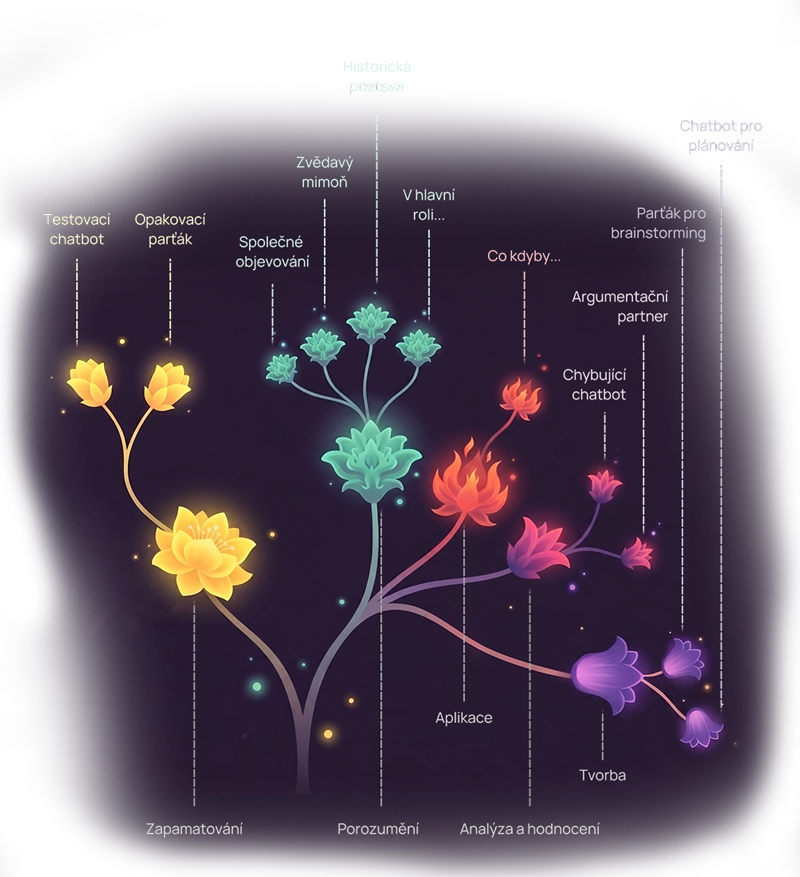
Pro přehlednost jsme je rozdělili do několika kategorií, které vycházejí z revidované Bloomovy taxonomie. V květinovém diagramu vidíte kognitivní úrovně (pojmenovány v dolní části obrázku), z nichž se větví konkrétní chatboti (horní část obrázku). Dělení pomáhá Tiny správně definovat vzdělávací cíle i kritéria hodnocení, na základě nichž vám i žákům dáváme zpětnou vazbu na konverzace.
Zapamatování
Když potřebujete, aby si žáci látku upevnili
Opakovací parťák
Provází žáka opakováním látky. Rozkládá celek na menší kroky, doptává se, vrací se k chybám. Trpělivý průvodce, který se přizpůsobí tempu žáka.
Vhodné na opakování slovíček, vzorců, pojmů, dat…
Testovací chatbot
Vytváří a vyhodnocuje úlohy v různých formátech, např. výběr z možností, krátká odpověď, doplňování, přiřazování… Na konci dá žákovi shrnutí výkonu.
Vhodné na ověření znalostí na začátku nebo konci lekce.
Porozumění
Když chcete, aby žáci látce skutečně rozuměli
Společné objevování
Vede žáka učením skrze otázky. Místo výkladu se ptá, ověřuje porozumění, doptává se na souvislosti. Ideální na samostudium nebo pro nadané žáky.
Vhodné na hloubavou práci s textem, samostatné objevování tématu.
Zvědavý mimoň
Předstírá, že tématu nerozumí, a nechá si ho od žáka vysvětlit. Doptává se na pojmy, vztahy, příčiny. Když žák něco neumí vysvětlit, hned to vidíte.
Vhodné na ověření, že žáci látku skutečně chápou — ne jen poznávají.
Historická postava
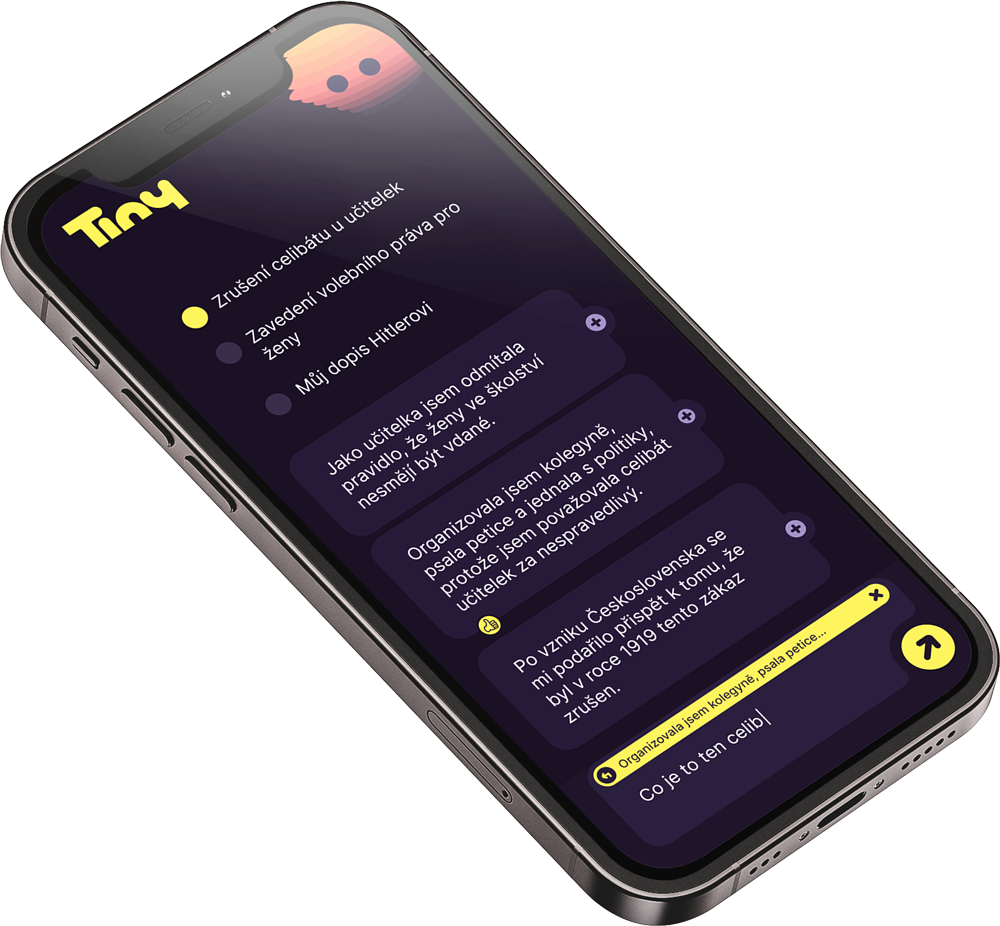
Chatbot se vtělí do historické postavy a odpovídá z její perspektivy. Žáci s ní vedou rozhovor a skrze něj poznávají dobu, motivace a souvislosti.
Vhodné pro výuku dějepisu, literatury, ZSV… (Karel IV., Komenský, Marie Curie, Darwin).
V hlavní roli…
Chatbot se vtělí do čehokoli — buňky, sodíku, duhy, květiny — a odpovídá v první osobě. Žáci se učí klást přesné otázky a skrze dialog poznávat vlastnosti zkoumaného jevu.
Vhodné pro výuku přírodovědy, biologie, chemie, fyziky…
Aplikace
Když chcete, aby žáci se znalostí nebo dovedností pracovali dál
Co kdyby…
Nabídne hypotetickou situaci („Co by se stalo, kdyby Slunce zhaslo?“, „Co kdyby v Evropě nikdy nebyla průmyslová revoluce?“) a vede žáka k promyšlení důsledků.
Vhodné pro rozvíjení kauzálního myšlení, aplikace znalostí nebo dovedností v nových kontextech.
Analýza a hodnocení
Když chcete trénovat kritické myšlení
Argumentační partner
Vede s žákem diskusi z opačné pozice. Odhaluje slabá místa argumentace, upozorňuje na argumentační klamy, nutí žáka obhajovat tvrzení důkazy.
Vhodné pro výuku ZSV, mediální výchovu, filozofii… hodí se všude, kde je třeba rozvíjet argumentační dovednosti.
Chybující chatbot
Záměrně předkládá nesprávné informace a vyzývá žáka, aby je vyvrátil nebo ověřil. Skvělý trénink kritického myšlení a práce se zdroji.
Vhodné pro jakýkoliv předmět, ve kterém chcete rozvíjet čtení s porozuměním.
Tvorba
Když chcete, aby žáci něco vymýšleli
Parťák pro brainstorming
Pomáhá žákovi rozbíhat myšlení, generovat varianty a úhly pohledu, a pak z nich vybírat. Nehledá správnou odpověď — hledá co nejvíc nápadů.
Vhodné pro projektovou výuku, slohové práce, návrhy experimentů, kreativní zadání…
Chatbot pro plánování
Pomáhá žákovi (nebo týmu) rozvrhnout práci na konkrétní kroky — odhadnout čas, určit priority, rozpoznat rizika, rozdělit role.
Vhodné pro skupinové projekty, ročníkové práce, dlouhodobá zadání…
Pojďme být ve spojení!
Informace o nových funkcích v Tiny zasíláme občas naším newsletterem.
Co říkají učitelé z pilotu
Tiny už používají na desítkách škol
Tiny pilotně používají učitelé jazyků, přírodovědy, dějepisu i odborných předmětů — na základních i středních školách.

Časté otázky
Na co se nejčastěji ptáte
Ne. Chatboti jsou připravení našimi didaktiky a testovaní s pedagogy. Stačí, když zadáte téma a kontext hodiny. Pokud chcete, prompt si můžete sami upravit. Pokud ne, použijete ten, co máme připravený.
Tiny je zdarma pro učitele i žáky. Aplikaci vyvíjí nezisková organizace AI dětem za podpory Google.org a TAČR.
Ano. Žáci se zaregistrují stejně jednoduše jako učitelé — přes Google, Microsoft nebo e-mail. Do konkrétní hodiny se pak přihlásí čtyřmístným PIN, který jim nasdílíte.
Bezpečnost dat a soukromí žáků v Tiny řešíme v souladu s GDPR — data jsou uložena na serverech v EU, šifrovaná při přenosu i v úložišti, a osobní údaje žáků nikdy nepoužíváme k tréninku AI modelů. Před odesláním do jazykových modelů (OpenAI, Google) jsou data anonymizována, takže poskytovatelé modelů nedostávají informace, podle kterých by šlo identifikovat konkrétního žáka. Správcem dat je vždy škola, žáci a rodiče mají všechna práva podle GDPR a po ukončení spolupráce data do 30 dnů mažeme.
Tiny aktuálně využívá jazykové modely od společností OpenAI a Google, které patří mezi nejvyspělejší dostupné na trhu. Komunikace s nimi probíhá v anonymizované podobě. Může se stát, že v budoucnu budeme modely měnit nebo doplňovat tak, aby Tiny vždy fungovala co nejlépe.
S největší pravděpodobností ano. Chatboti jsou navržení univerzálně — fungují v matematice, dějepisu, biologii i angličtině… Konkrétní téma a kontext hodiny zadáváte vy. Pilotní učitelé Tiny používali na ZŠ i SŠ, v jazycích, přírodovědě, dějepisu i odborných předmětech (např. stavebnictví).
Chatboti jsou nastaveni tak, aby zůstali u své pedagogické role a nevedli žáka mimo téma. Tiny není náhrada učitele, ale parťák — proto doporučujeme s výstupy žáků dál pracovat a zároveň je upozorňovat, že AI modely ze své podstaty mohou halucinovat a je důležité výstupy prověřovat.
Notebook, tablet nebo mobil s prohlížečem a wifi. Žádná instalace, žádné speciální požadavky.
Tiny je primárně určena pro použití ve vaší lekci. Pokud ale spustíte lekci a necháte ji běžet, mohou žáci plnit úkoly v Tiny i doma.
Tiny si můžete zkusit ve své příští hodině
Stačí pár minut na přípravu. Vyberete chatbota, doplníte téma a žáci se připojí přes PIN.
Za Tiny stojí AI dětem a Google.org
Tiny vyvíjí česká nezisková organizace AI dětem ve spolupráci s mezinárodním týmem didaktiků, metodiků, vývojářů a akademiků. Aplikace vzniká na základě výzkumu s Matematicko-fyzikální fakultou, pilotního ověřování ve školách a testování s učiteli přímo v hodinách.